The most complete keyboard I've used on a Mac: great stock typing feel and sound, and Mac mode without extra software. The hidden power switch and fixed angle are the trade-offs.
- Mac mode with Fn + M, kept the layout over wireless
- Deep, soft typing sound and a spacebar that matches the rest
- Heavy aluminum case that doesn't move or flex
- USB-C, Bluetooth (3 devices) and 2.4 GHz
- My box had extra Mac keycaps
- Power switch under the Caps Lock keycap
- No adjustable typing angle
- No dongle storage
- Lots of Fn shortcuts to learn
- Regular mechanical switches, not Hall Effect
| Layout | 75% |
|---|---|
| Case | 6063 aluminum, about 2 kg with steel weight |
| Mount | Gasket, FR4 plate, four dampening layers |
| Switches | Hot-swap (mine: Kailh Cocoa linear) |
| Keycaps | Double-shot PBT |
| Battery | 7,000 mAh (claimed) |
| Connection | USB-C, Bluetooth (3 devices), 2.4 GHz |
I almost didn't buy the Rainy75 Pro because I use a Mac. After trying Keychron, NuPhy and a wooden XVX keyboard, I was tired of getting a new keyboard and immediately having something to fix.
After about a month of daily use, the Rainy75 Pro is probably the most complete keyboard I've used so far. I like the typing feel, the spacebar sounds right, and Mac mode worked without extra software.
There are real downsides. The power switch sits underneath Caps Lock, the typing angle is fixed, and there's nowhere to store the wireless dongle.
I bought this keyboard with my own money. WOBKEY didn't sponsor this review.
Design and build: heavy enough to stay put
The weight was the first thing I noticed. WOBKEY lists about 2 kg for the Pro, and picking it up makes that believable. The metal feels cold, the finish looks excellent, and the case doesn't flex.
Once I put it on the desk, it stays there, which is what I want. I wouldn't choose it as something to carry around.
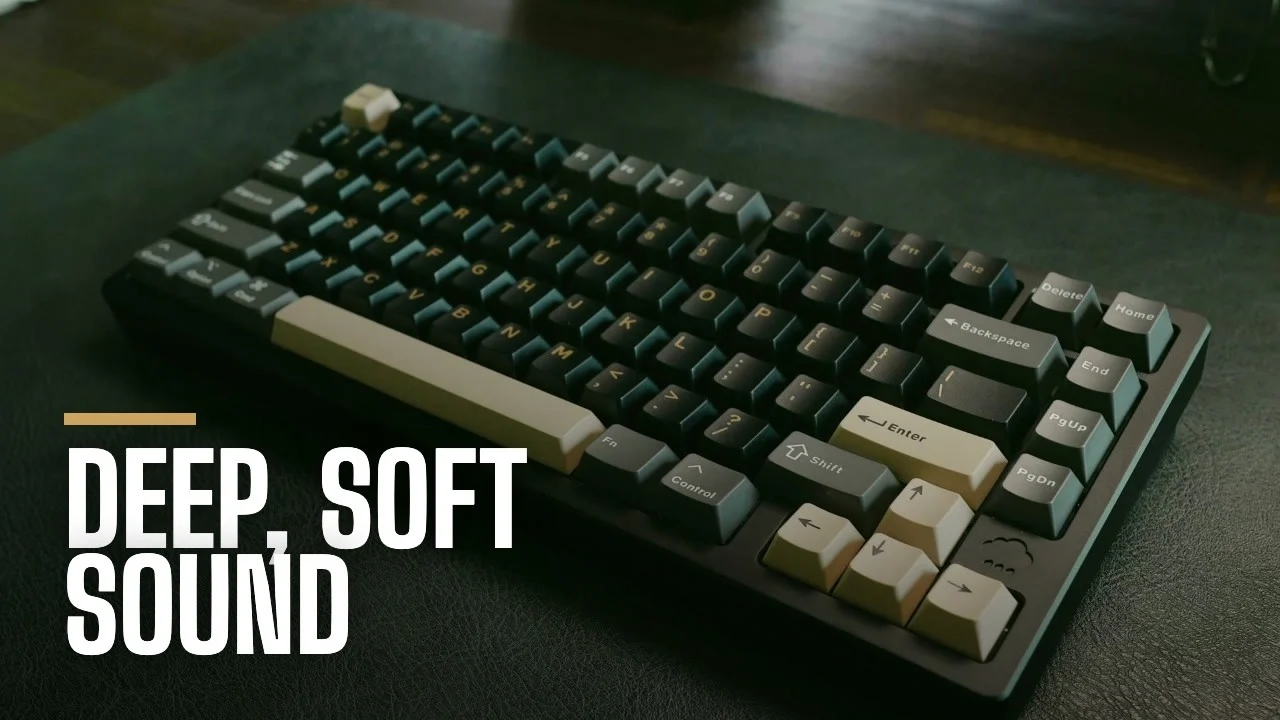
Mine is the black version with black, beige and gray keycaps. I like this combination a lot. It's clean and minimal, and it doesn't look like it belongs in a gaming tournament.
In the box I got a USB-C cable, a keycap and switch puller, and the documentation.
My package also included Mac keycaps. Those extras aren't in WOBKEY's official contents list, so I can only confirm what came with my unit.
Keycaps and lighting
The double-shot PBT keycaps feel great, and the Cherry profile is comfortable for typing.
There's RGB lighting, but I turned it off almost immediately. The legends don't shine through anyway, and I think the keyboard looks better without it.
Typing feel and sound: the spacebar gets it right
Inside there's a gasket mount, an FR4 plate and four layers of dampening. It feels soft under my fingers but still precise.
This is one of the nicest typing experiences I've had so far. The sound is deep and pleasant, without the hollow feel I've heard on some other mechanical keyboards.
My unit has Kailh Cocoa linear switches. They're smooth and relatively light, and I'm happy with them as they came. I didn't buy this keyboard because I wanted another modding project. The switches are hot-swappable, so you can replace them later if you want.
The spacebar deserves its own mention. On so many keyboards, the spacebar sounds like a completely different product: it rattles, feels loose or makes a hollow noise every time I press it.
On my Rainy75, it feels solid and sounds like the rest of the keyboard.
Sound is subjective, and I'm describing my own unit.
Mac support: the main reason I'm happy with it
The typing is good, but Mac compatibility impressed me more. It was also the reason I hesitated before buying.
With my previous wooden XVX keyboard, I had to mess around with Karabiner and keyboard settings just to get a proper Mac layout, especially over wireless. A keyboard shouldn't need troubleshooting just to type on your computer.
The Rainy75 was much easier. My box included extra Command, Option, Control and Fn keycaps, so I didn't need to order anything.
Here's what I did:
- Replaced the keycaps with the Mac ones from my package.
- Held Fn + M for three seconds to switch to Mac mode.
- Checked Command, Option, brightness and volume.
That was pretty much it. Command and Option worked correctly, and so did brightness and volume. The keyboard also remembered the Mac layout when I used it wirelessly. I didn't need Karabiner or any other software.
The layout still differs from Apple's
To the right of the spacebar, you get Fn and Control rather than a second Command key. That may matter if you use the right Command key on an Apple keyboard.
I first made the mistake of thinking that moving the Fn keycap would move the function. It doesn't. Changing the cap only changes the label. The Fn key stays where it is unless you remap it in VIA, but the basic Mac setup didn't need that.
Connectivity and battery
The Rainy75 Pro gives you three connection options:
- USB-C for a wired connection.
- Bluetooth, with up to three paired devices.
- 2.4 GHz wireless through the included dongle.
Switching modes uses Fn + Tab. There are quite a few Fn shortcuts on this keyboard, so keep the manual nearby for the first few days.
WOBKEY lists a 7,000 mAh battery for the Pro. I haven't done a controlled battery test yet, but so far I haven't charged it once, and it's been almost a month of daily use with the RGB off.
You can check the charge right from the keyboard with Fn + Space.
The downsides
The power switch is under Caps Lock
This is the design decision I like least. To reach the power switch, you have to physically remove the Caps Lock keycap. I've seen this on other keyboards too, and I still don't know why brands keep doing it.
It hasn't stopped me using the keyboard, and I don't need the switch often. But if you turn your keyboard off every day, think about whether you want to pull a keycap to do it.
No adjustable typing angle
There are no folding feet, so the typing angle is fixed. I'm comfortable with it, but if you know you need to change the angle, this is a reason to skip it. I don't miss the folding feet on my Keychron, though: their rubber pads kept coming loose.
No dongle storage, and VIA takes effort
There's nowhere inside the keyboard to store the 2.4 GHz receiver. For a keyboard that stays on my desk, that isn't a deal-breaker.
Advanced customization is available through VIA, but setting it up isn't as easy as turning on Mac mode.
The switches also aren't Hall Effect. If adjustable actuation for competitive gaming matters to you, there are better options.
Rainy75 Pro vs Keychron K2 HE
For my everyday Mac setup, I'd buy the Rainy75 Pro instead of a Keychron, without hesitation.
Some Keychron keyboards are genuinely good. The K2 HE has magnetic switches and features the Rainy75 doesn't have. If you want those, the K2 HE is the better pick — my Keychron K2 HE review covers it.
But for build quality, sound and the feel of typing, I prefer the Rainy75. The case stays planted, the keys feel good, and the spacebar doesn't bother me.
At around $150, depending on the configuration and where you buy it, the Rainy75 Pro feels like a more expensive custom keyboard that you don't have to build or mod first.
Who should buy it, and who should skip it
Buy it if you type on a Mac every day and want a heavy wireless 75% keyboard that feels and sounds good out of the box.
Skip it if you need adjustable actuation, an adjustable typing angle or a keyboard you carry around. Take the hidden power switch seriously if you turn your keyboard off often.
Upgrade if your current keyboard gives you the same problems I had: awkward Mac setup, a hollow sound or a spacebar that feels wrong. If you already like your keyboard's feel, sound and Mac behavior, I don't have a strong reason to tell you to replace it. And if you bought a K2 HE for its magnetic switches, the Rainy75 won't replace them.
WOBKEY is working on another Rainy keyboard and plans to send me one ahead of its Kickstarter launch. I haven't used it yet, so I can't compare the two.
FAQ
How do you turn on Mac mode on the Rainy75 Pro?
Hold Fn + M for three seconds. On my Mac, Command, Option, brightness and volume worked, and the keyboard kept the Mac layout over wireless.
Does the Rainy75 Pro come with Mac keycaps?
My package included Command, Option, Control and Fn keycaps. They aren't in WOBKEY's official contents list, so I can only confirm what came with mine.
How long does the battery last?
I've gone almost a month without charging, with RGB off. I haven't done a controlled test, so I can't give a measured runtime.
Where is the power switch on the Rainy75 Pro?
Under the Caps Lock keycap. You have to pull the keycap off to reach it.
Can I change the switches?
Yes, they're hot-swappable. Mine are Kailh Cocoa linear, and I've been happy with them stock.
WOBKEY Rainy75 Pro