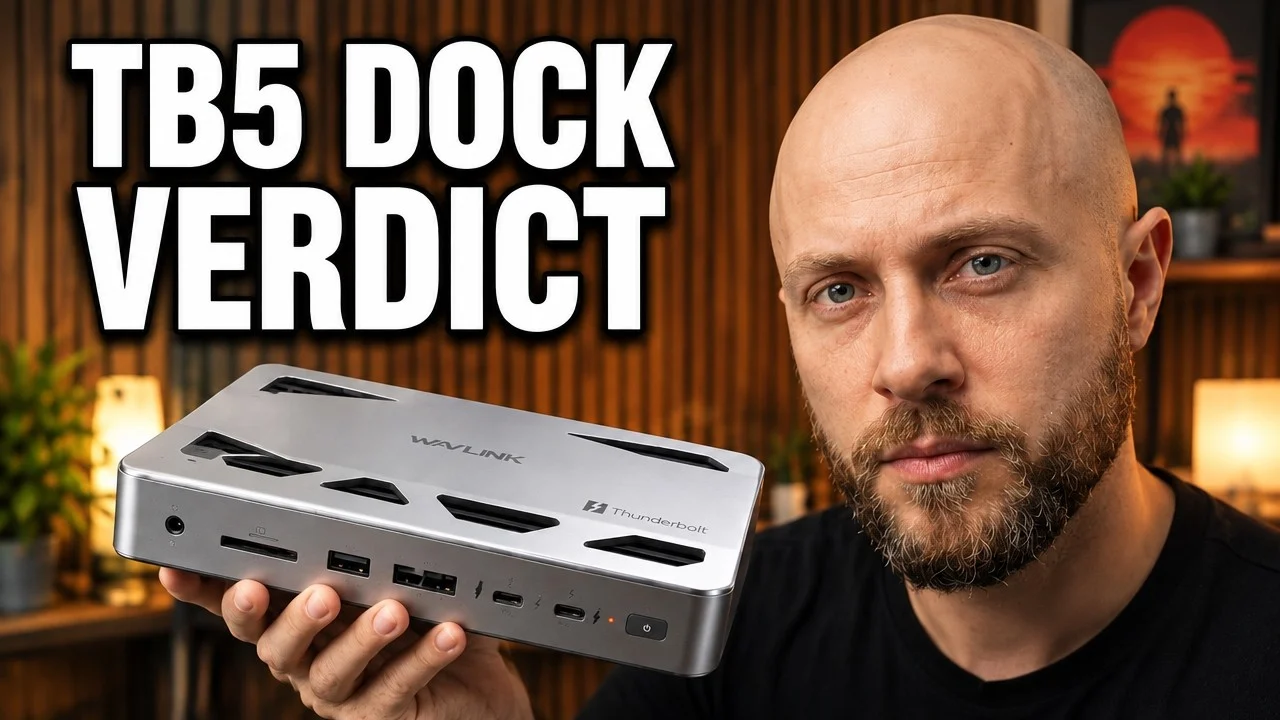
A well-made Thunderbolt 5 dock with the specifications that matter. The engineers got the inside right, then made the exterior layout a little weird.
- Heavy aluminum build with good cooling
- Up to 140W laptop charging
- Thunderbolt 5 for fast storage and displays
- USB, card readers and 2.5Gb Ethernet
- Two-year warranty
- A huge external power brick
- The host cable comes out of the front
- No HDMI or DisplayPort
- Check macOS display limits before buying
- Expensive at around $300
- Overkill for a one-monitor desk
| Connection | Thunderbolt 5 |
|---|---|
| Laptop charging | Up to 140W |
| Power supply | 200W, large external brick |
| Networking | 2.5Gb Ethernet |
| Video outputs | Thunderbolt / USB-C only, no HDMI or DisplayPort |
| Displays on macOS | Up to 2 |
| Card readers | Front-facing |
| Build | Metal, about 600 g |
| Price | About $300 |
A Thunderbolt dock does not need to be exciting. Honestly, it probably should not be. Its job is to sit on the desk, connect everything through one cable, charge the laptop, and stay out of the way. If it does all that without drama, it has done the job.
That is pretty much the story with the Wavlink UTD58. It is a serious Thunderbolt 5 dock with a hefty metal chassis, plenty of connectivity, up to 140W laptop charging, 2.5Gb Ethernet, card readers, and support for multiple displays. It is not a cheap accessory, and it has a couple of genuinely strange design choices, but the core hardware is solid.
Quick Verdict
The Wavlink UTD58 is a capable Thunderbolt 5 docking station for people with a current MacBook or Thunderbolt 5 laptop who actually need fast storage, multiple displays, wired networking, and a clean one-cable setup.
At around $300, it is not an impulse purchase. But that is normal territory for Thunderbolt 5 docks, and some premium alternatives cost considerably more. The UTD58 earns its price through the important bits: a strong power supply, a broad port selection, a heavy aluminum build, and the ability to consolidate a demanding desk setup into one laptop connection.
My short version is this: the engineers got the inside right, then made the exterior layout a little weird.
Wavlink UTD58 at a Glance
- Connection: Thunderbolt 5 and USB-C based docking
- Laptop charging: Up to 140W through the host cable
- Total power supply: 200W
- Networking: 2.5Gb Ethernet
- Display connections: USB-C and Thunderbolt only, with no built-in HDMI or DisplayPort
- Expansion: USB ports, front card readers, and support for external SSDs and peripherals
- Construction: Metal body, approximately 600g, rubber feet, and top ventilation cutouts
- Warranty: Two years
- Typical price: Around $300
If that sounds like overkill for a keyboard, mouse, and single 4K screen, it probably is. A normal Thunderbolt 4 dock will handle that job for less money. The UTD58 makes more sense when the desk has started collecting fast drives, more displays, wired networking, card readers, and the usual tangle of cables.
Build Quality: Heavy, Metal, and Happily Boring
First impressions are good. The UTD58 is built from metal, feels properly solid, and weighs around 600 grams. That mass matters more than it sounds. When I pull out an SSD cable or move a peripheral, I do not want the dock skating across the desk with it.
Wavlink has also fitted rubber feet underneath, so it stays put. It is a small detail, but docking stations are constantly being tugged by cables. A light plastic dock can feel like an annoyance every time something needs to be plugged in. This one feels planted.

The top is covered in large cutouts. They are not just there for the industrial look. A Thunderbolt 5 dock is pushing a lot of data while delivering up to 140W to a laptop, so heat is part of the deal. The chunky aluminum chassis and generous ventilation are sensible design decisions, and I would take them over a thinner, prettier box that runs uncomfortably hot.
It is not trying to disappear into a minimal setup. This is a substantial little piece of hardware. But it feels built for a desk that gets used, not just photographed.
One Cable Is the Entire Point
The promise of the UTD58 is simple. Plug one cable into the laptop and leave the rest connected to the dock: keyboard, mouse, SSD, Ethernet, memory cards, displays, and power. When it works as intended, coming to the desk is just one cable rather than a ritual of plugging things in individually.
For me, the 140W host charging is the major selling point. I use an M5 Max MacBook Pro, and the dock can charge it through that same Thunderbolt connection. That is exactly the experience I want from a higher-end dock. No second charging cable draped across the desk. No separate power brick plugged into the laptop. Just one connection.
The laptop port also includes a small cable clamp. That may sound minor, but it is useful if the cable gets knocked or pulled accidentally. The host connection is the most important cable in the entire setup, so having a way to secure it makes sense.
Ports and Desk Connectivity
Port selection is one of the UTD58's strengths. It gives a modern laptop a proper permanent home for the accessories that tend to pile up around a workstation.
There are front-facing card readers and USB ports for quick access, while the rear handles the connections that generally stay attached. That includes power and 2.5Gb Ethernet, alongside additional USB-C and Thunderbolt connectivity. Fast external SSDs, cameras, memory cards, keyboards, mice, and wired networking are all the sort of gear this dock is designed to absorb.
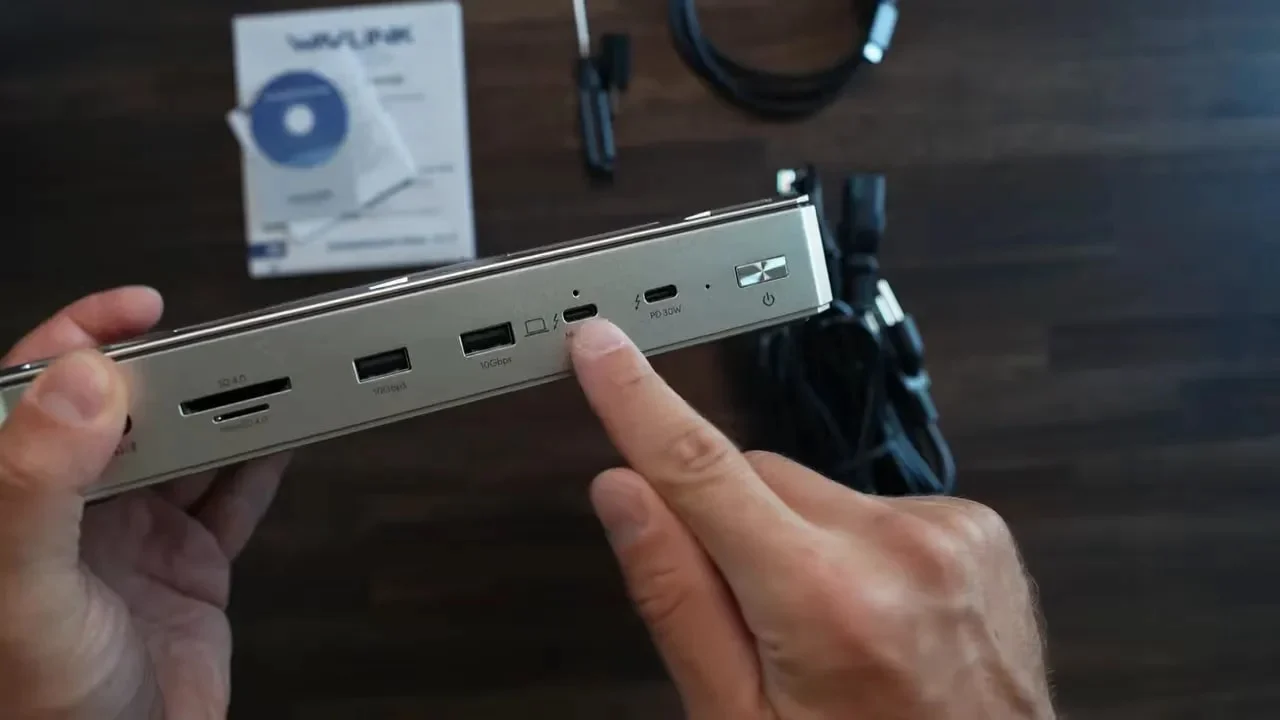
That back-versus-front split is mostly logical. Permanent cables should go out the back. A power cable, Ethernet cable, and display cables are not things I need to reach every day, so keeping them behind the dock helps make a desk look less chaotic.
The issue is that Wavlink has put the single most important cable, the laptop host cable, on the front. I genuinely had to stop and wonder whether the dock was meant to stand vertically. It is not.
So the cable that connects the laptop to everything comes forward from the dock instead of going out the rear with the other long-term connections. It works perfectly well, but it makes cable management harder than it needs to be. On a product designed to simplify a desk, that is a strange own goal.
There is also a physical power button. It feels slightly old-school, like something that wandered in from a 2010 router, but that is a very minor complaint. The front-facing host cable is the real layout issue.
Display Support: Check Your Setup Before Buying
The UTD58 can handle a single monitor without any real drama. The important point is that this dock is built around Thunderbolt and USB-C display connectivity. There is no HDMI and no DisplayPort built into the chassis.
If the desk uses modern USB-C monitors, great. This dock fits that setup nicely. If there are a couple of conventional HDMI displays already in place, adapters will be part of the purchase. That does not make the dock bad, but it absolutely needs to be factored into the total cost and cable plan.
Multiple-monitor support is where people need to slow down and check compatibility. My M5 Max MacBook Pro can drive up to four monitors through a single Thunderbolt connection, but the UTD58 is specified for two displays on macOS. That distinction matters.
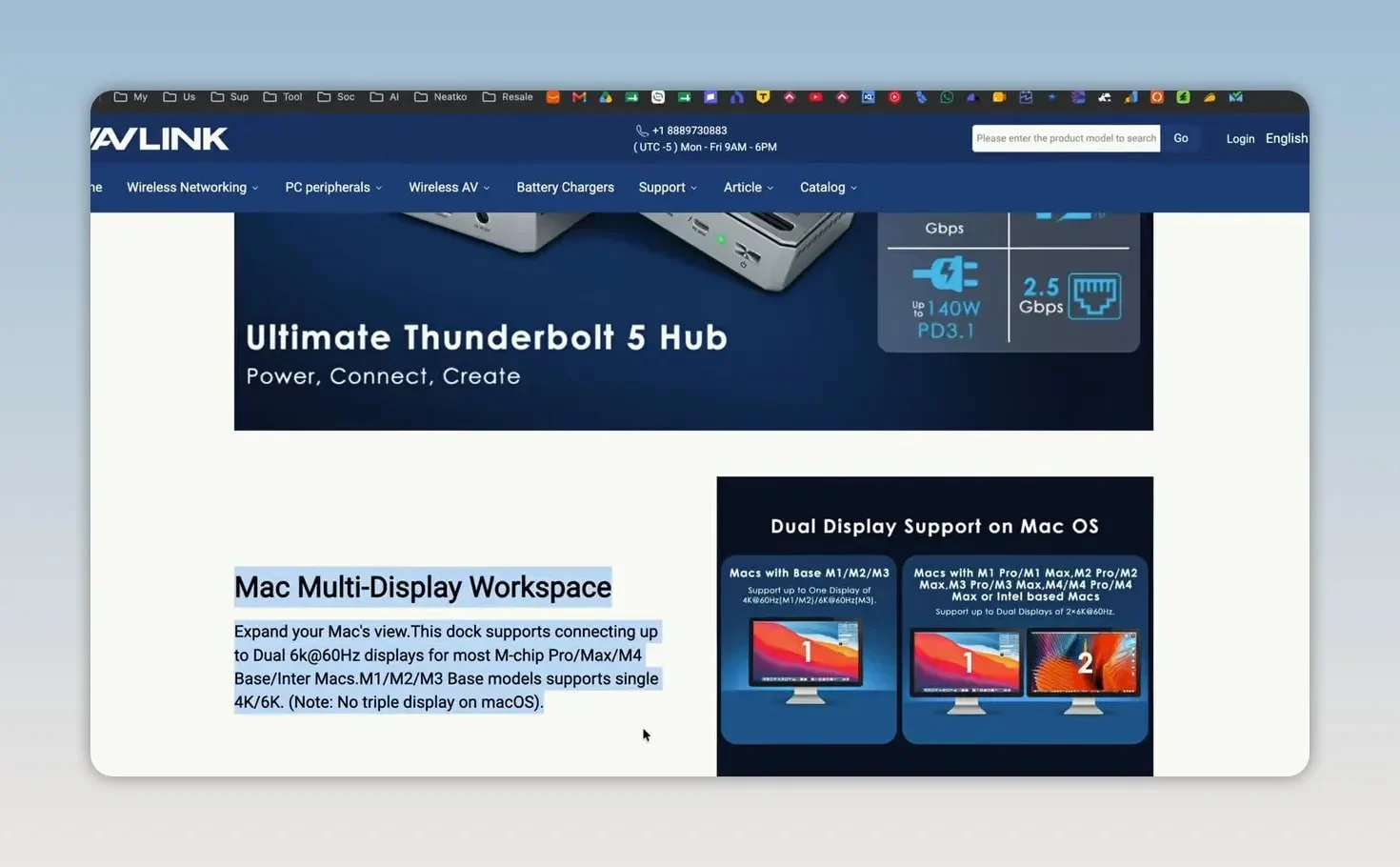
Do not assume that a laptop's maximum display capability automatically becomes the dock's maximum display capability. If the goal is to run three or four displays from a new Mac, confirm the UTD58's compatibility with the exact laptop and monitors before spending the money.
For one or two USB-C displays, the dock is a much more straightforward proposition. For a complex multi-screen setup, do the homework first.
Power Delivery Is Properly Useful
The UTD58 has a 200W power supply and can deliver up to 140W to the connected laptop. That is a proper number for a high-performance notebook, not a token amount that merely slows down battery drain.
It is also why this dock feels aimed at serious laptop setups rather than basic office use. A lower-cost dock can handle the essentials, but once power requirements climb and fast peripherals enter the picture, the more capable power budget becomes important.
This is especially useful for people who want to treat a laptop like a desktop during the day and unplug it quickly when it is time to go. One Thunderbolt cable supplying power and carrying data to the whole desk is the cleanest version of that workflow.
What I Like
- Excellent build quality: The metal body, rubber feet, and 600g weight make it feel stable and durable.
- Up to 140W charging: One cable can power a capable laptop while connecting the rest of the desk.
- Thunderbolt 5 connectivity: This is made for current high-bandwidth laptops and fast external storage.
- Useful everyday expansion: USB, card readers, 2.5Gb Ethernet, and display connectivity cover a lot of ground.
- Good thermal design: The vented aluminum body is reassuring in a dock handling heavy data and power loads.
- Two-year warranty: A welcome bit of coverage at this price.
What I Do Not Like
- Front-facing host cable: It is the biggest design mistake because it works against a clean desk layout.
- No HDMI or DisplayPort: USB-C monitor users are fine, but HDMI monitor owners will need adapters.
- macOS display limitations need attention: It is not the obvious choice for someone expecting four displays from a Mac.
- It is expensive: Around $300 is normal for Thunderbolt 5, but it is still a lot of money for a dock.
- Overkill for simple setups: If the setup is just one 4K monitor, keyboard, and mouse, Thunderbolt 4 is the smarter value option.
Who Should Buy the Wavlink UTD58?
I would recommend the UTD58 to someone using a current MacBook or Thunderbolt 5 laptop who needs more than basic expansion. If the desk includes fast SSDs, a couple of monitors, wired 2.5Gb networking, camera cards, and USB peripherals, the one-cable convenience starts to justify the price.
It is also a strong option for anyone who values build quality. The dock is not flimsy, it does not slide around easily, and the thermal design feels appropriate for the amount of power and data moving through it.
The best fit looks something like this:
- A modern MacBook or Thunderbolt 5 Windows laptop
- One or two USB-C displays
- Fast external SSDs or other bandwidth-hungry accessories
- A need for 2.5Gb wired Ethernet
- A desire to charge the laptop through one cable
- A desk setup where a dock stays connected permanently
If that is your situation, the Wavlink UTD58 listing is worth a look.
Who Should Skip It?
If all that is needed is a keyboard, mouse, one 4K display, and occasional charging, I would not spend Thunderbolt 5 money here. A decent Thunderbolt 4 dock can do that job for less.
I would also look elsewhere if the desk relies on multiple HDMI displays and adapters sound like a headache, or if the goal is to run more than two displays from a Mac through this single dock. There are setups where the UTD58 is a neat answer, but it is not the universal answer.
Wavlink UTD58 vs Anker Prime TB5: I also reviewed the Anker Prime TB5. It costs more, around $400, but builds the power supply in, so there is no big brick on the desk, and adds HDMI and DisplayPort outputs (one at a time). Read the Anker Prime TB5 review.
Final Thoughts
The Wavlink UTD58 is one of those products that earns praise by being sensibly uneventful. The hardware is good. The build is great. Thunderbolt 5 is here, the port selection is generous, and full 140W laptop charging makes the one-cable setup genuinely useful.
Its weaknesses are not deal-breakers, but they are worth knowing before buying. The lack of HDMI and DisplayPort means adapters for traditional monitors. The macOS display count must be checked carefully. And I still cannot make sense of why the laptop cable comes out of the front.
Still, for a high-end Thunderbolt 5 desk setup, it is a well-made dock with the specifications that matter. A docking station being a bit boring is basically a compliment. I want it to sit there, do everything quietly, and give me one cable to unplug when I leave the desk. The UTD58 does that very well.
Related reviews: MacBook Pro M5 Max first look and Xiaomi vs Quntis monitor light bar comparison.
Wavlink UTD58